

Feed Categories & Filtering
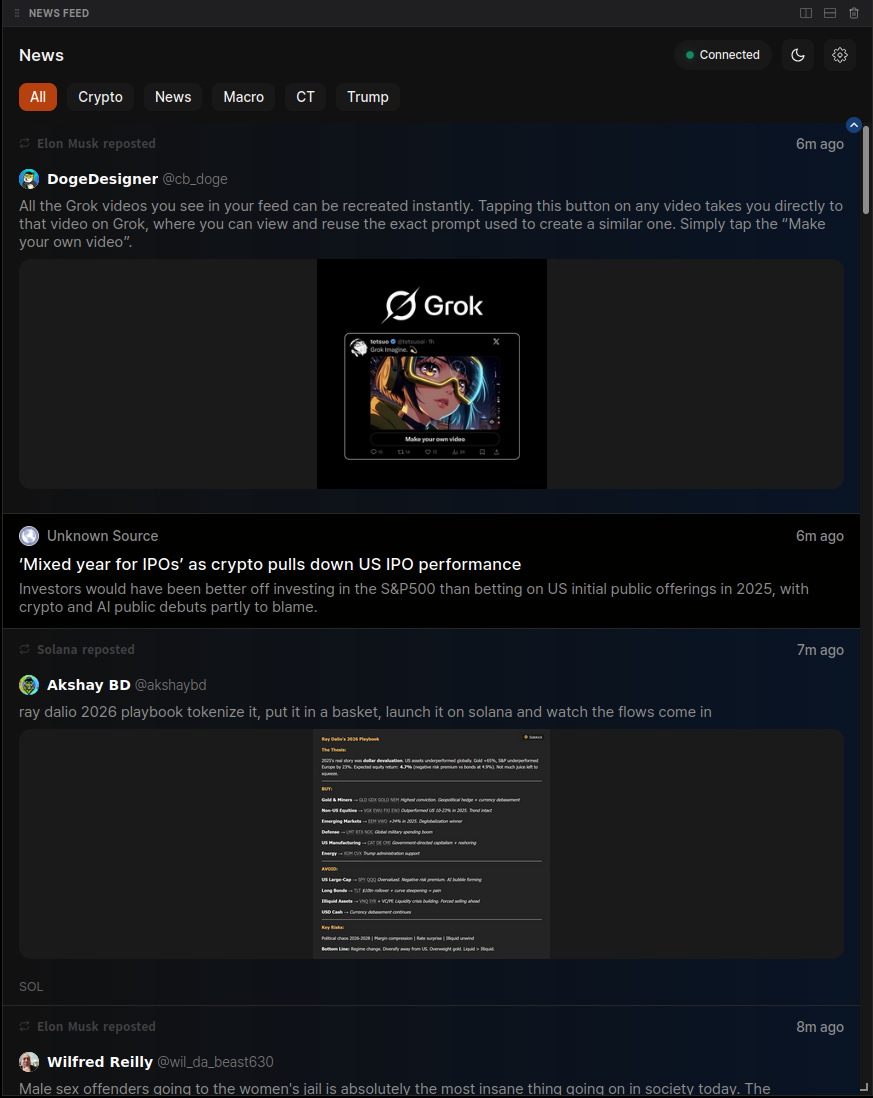
To help you filter out noise, the News Feed provides specialized category tabs to isolate specific narratives.- All: A consolidated view of all tracked sources.
- Crypto: Focused exclusively on major industry voices, protocol updates, and exchange announcements.
- News: Aggregated headlines from reputable crypto and financial news organizations.
- Macro: Real-time updates on global economic data, interest rate decisions, and traditional finance news.
- CT (Crypto Twitter): High-signal influencers and analysts from the X ecosystem.
- Trump: A dedicated filter for tracking political developments and social signals related to Donald Trump and their impact on market volatility.
News Feed Settings
You can fully customize the visual style and behavior of your feed to match your workspace layout.Media & Content Control
- Media Preview: Toggle between Standard (compact) and Full Size previews for images and videos shared in the feed.
- Autoplay Media: Enable or disable the automatic playback of video content within the feed.
- Tweet Filtering: Control whether to Include Tweet Replies or only show top-level posts to maximize signal density.
Visual Customization
- Hover Effects: Enable Zoom on Hover or Glow on Hover to make active news items easier to focus on.
- Text Size: Adjust the font size via a slider to optimize readability for your specific screen resolution.
- Tag Color: Personalize the highlight color for hashtags, cashtags (e.g., $BTC), URLs, and mentions using the built-in color palette.
Interaction & Engagement
The feed maintains a live connection status to ensure you are receiving the latest updates.- Real-time Connectivity: The “Connected” status in the top right confirms your feed is actively streaming.
The News Feed is designed for speed. When a major headline breaks, the feed will automatically push the most recent posts to the top to ensure you catch the move as it happens.