

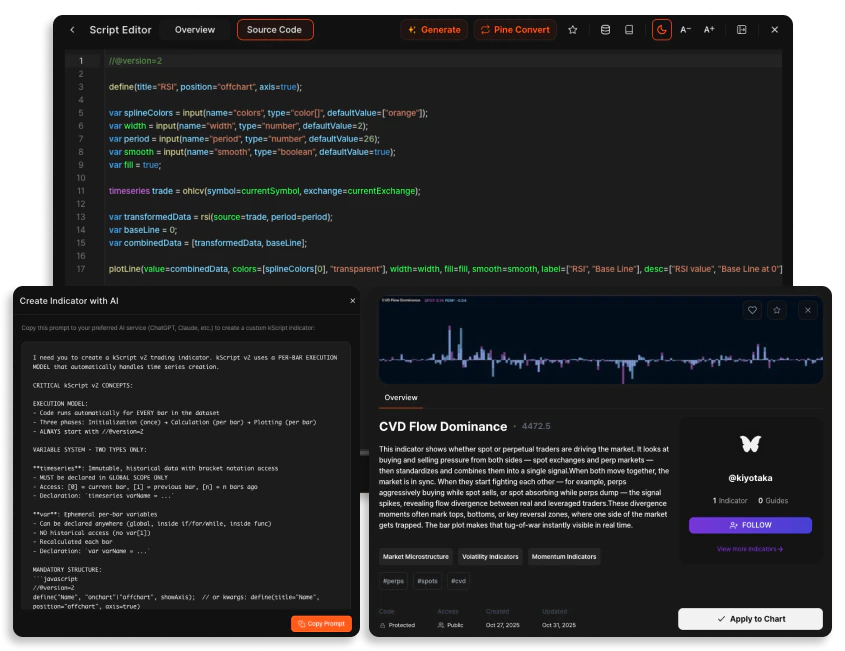
The Script Editor
The kScript Editor is a highly flexible development environment designed to fit your specific workflow. It supports two distinct display modes for coding and analysis.Editor Modes
- Undocked (Float): The editor appears as a floating window over your chart, allowing you to move it freely and focus entirely on the code.
- Docked: The editor pins to the right side of the screen as part of the terminal, enabling simultaneous code editing and real-time chart monitoring.
Workspace Tabs
- Source Code: The primary IDE featuring syntax highlighting and essential coding tools.
- Overview: A management interface used to define the indicator’s identity, visibility, and categorization.
Editor Tools & Utilities
- Build with AI: Generate custom indicators by providing natural language prompts to integrated LLMs.
- Pine Convert: A specialized prompt template to convert existing PineScript code into kScript.
- Reference Dialog: Access the built-in kScript documentation directly within the editor.
- Data Dialog: Inspect raw source data and verify plot outputs for logic validation.
Indicator Metadata & Categorization
To ensure your scripts are professional and discoverable, the Overview tab provides extensive customization options:- Thumbnails: Upload a custom image (PNG or JPG up to 2MB) to provide a high-quality visual preview of the indicator.
- Categories: Assign your script to up to three specific categories—such as Trend Indicators, Orderflow Analysis, or Market Microstructure—to help users understand its purpose.
- Rich Description: Use the built-in text editor to provide detailed logic explanations and use cases.
Access Control & Evaluation
Manage the privacy of your intellectual property and track how the community interacts with your tools.- Access Control: Toggle visibility between Private (personal use) and Public (visible to the community).
- Code Visibility: Choose Open to share your logic or Protected to keep your source code proprietary.
- kScore: A fair evaluation of each published indicator, calculated internally via a proprietary formula to measure popularity and usage analytics.
- Forking: Indicators with Open code visibility are forkable, allowing other users to fork the script and further customize the logic to suit their needs.
Community & Engagement
The Community Scripts section is the central hub for discovering and managing indicators.- Favorites: Save high-value community indicators to your favorites list for instant access on any chart.
- My Scripts: Access your personal drafts, published tools, and forked code in one location.